|
4 min read
Setting up auto-crawl for your AI Chat: always up-to-date answers
Read more



It was a familiar and recurring question from our customers: "Can I use WhatsApp Business on multiple devices at the same time?". A good question, because that would allow you to get even more out of Wappy than was already possible. Unfortunately, we always had to answer negatively until now. The moment has finally arrived that a WhatsApp account on an iPhone or Android mobile can be linked to four different devices, WITHOUT the mobile being online or turned on. We will tell you more about it here!
Last updated: 12 Feb 2026
In the summer of 2021, it finally happened: WhatsApp Business can be used on multiple devices at the same time! Thanks to the new update from WhatsApp, it is possible to use WhatsApp Business on four other devices in addition to your phone. In this blog, we will first discuss the many advantages this offers, for consumers and especially for Wappy users.
The situation before this update was as follows. Your mobile phone needed to have an internet connection when you wanted to use WhatsApp Web. The web version synchronized with the smartphone app, which was not possible without an internet connection. This meant that when the smartphone was not connected or turned off, WhatsApp Web did not work. WhatsApp on the computer was nothing more than a relay to and from the app on the phone. Moreover, a difficult situation had arisen for businesses. Many companies nowadays have WhatsApp as part of / an option within their customer service. Because in this situation only two people could respond via WhatsApp at the same time (1 on the phone, the other via WhatsApp Web), this limited many businesses.
That is now changing, currently only with a beta version. With the new feature, WhatsApp can be used on four devices, in addition to your smartphone. These can be computers, but also tablets (via the browser). It is not possible to use one account on multiple phones, but the app can be linked to four different devices at the same time. So now you can use WhatsApp Business with five colleagues and respond to the questions coming in through your Wappy chat window!
By linking your WhatsApp Business account to a WhatsApp widget on your website, you can enjoy the benefits of WhatsApp Business, and more! The widget provides customers with an easy way to contact your business and is fully customizable. Additionally, within the dashboard of your widget, you can read the messages sent to you. This means that your other employees can also find the questions from website visitors. Convenient, of course, as these questions can be clarified on the website or included in the FAQ. Thanks to the new feature within WhatsApp Business, now 5 colleagues can simultaneously staff your customer service and answer Wappy chats.
Do you also want to enjoy the benefits of a WhatsApp widget and WhatsApp Business combined? Then create your own widget for free, customize it completely to your taste and corporate identity, and help website visitors take the last step!
According to us, there are only advantages associated with using WhatsApp Business on multiple devices. That's why we immediately looked into how we and our Wappy users can achieve this. Fortunately, it's very easy.
Do you want to use the new feature of WhatsApp?
It is good to know that any previously linked devices now need to be re-linked via QR code. Once set up and linked, (four) other devices can now send and receive messages!
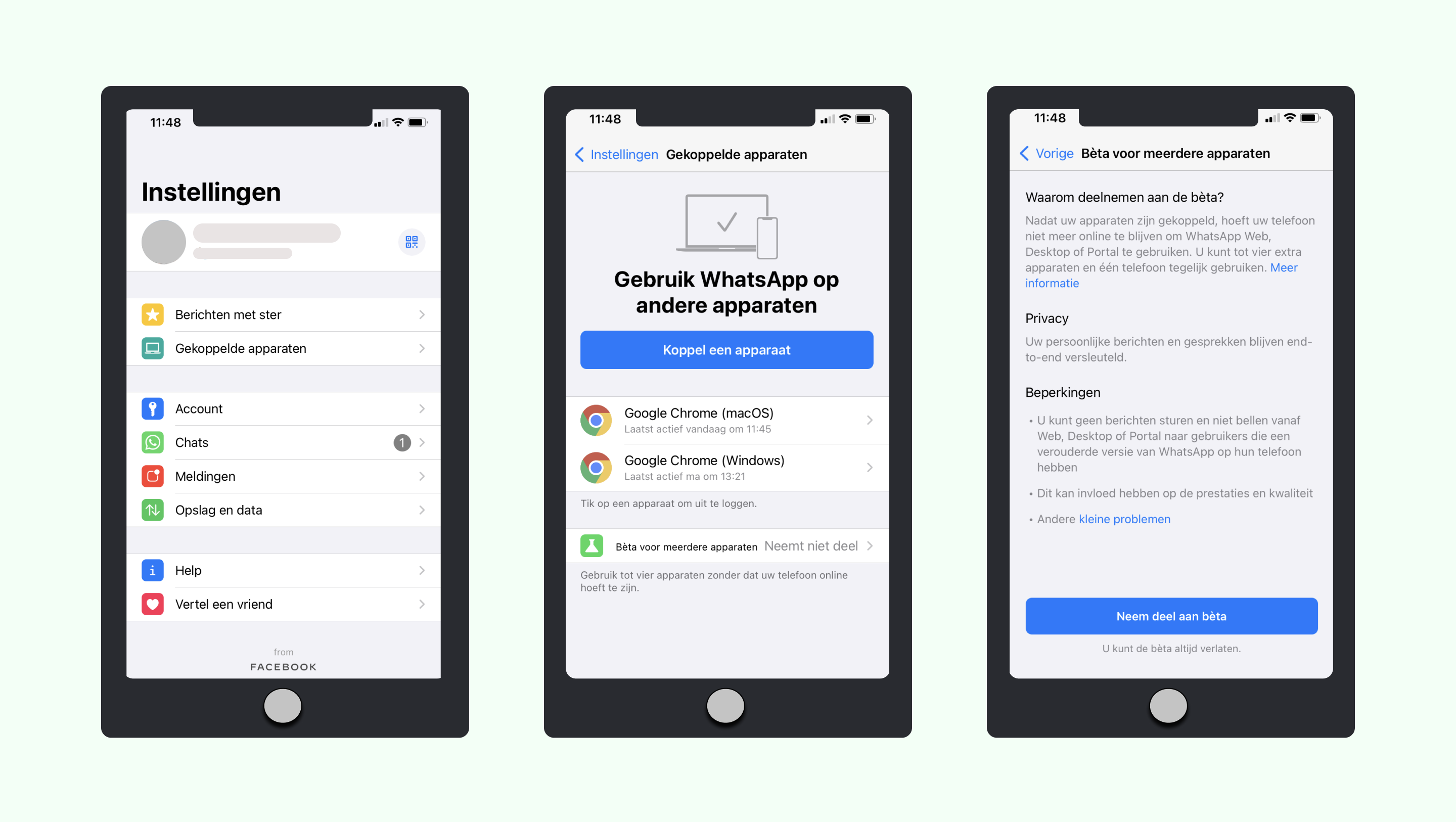
Once everything is set up within your WhatsApp Business account, it's time to link your devices. Here's how to do it:
Tip: Working with multiple people simultaneously within one WhatsApp account can become confusing. Has someone already responded to that message? And what was this conversation about? A good way to solve this problem is by using labels and categorizing conversations or adding your name to the messages you are working on.

niice
Wappy helps businesses connect with website visitors through WhatsApp. With over 2,400 websites using our widget, we share practical tips on WhatsApp Business and customer communication.
End of this Wappy article🤓

Do you want to try Wappy first? Then we have a free version available for you!
Over 2,400 websites use Wappy for customer contact