|
4 min read
Setting up auto-crawl for your AI Chat: always up-to-date answers
Read more



WhatsApp Business has a number of specific business tools that WhatsApp itself does not have and are very useful for your company. One of these tools is the 'statistics' tab. With this tool, you can learn more about your customers!
Last updated: 12 Feb 2026
Go to your settings and click on the ‘business tools’ tab. Here you can click at the top right of your screen and then choose the ‘statistics’ tab. The following statistics can be seen here:
In the future, information about response time to messages and information about the number of messages that have actually been read is also expected.
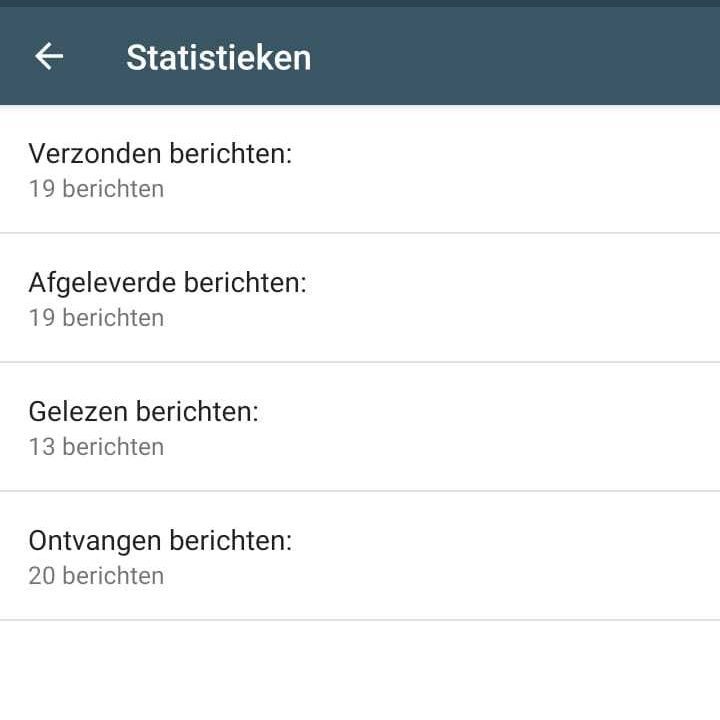
Although WhatsApp currently does not offer many statistics, you can learn more about your customers and conversations through the available statistics. Improve your customer service and give your customers the attention they deserve!
By keeping track of your WhatsApp Business statistics, you can significantly improve your customer service and customer relationships. Do you want to make it even easier to connect with website visitors and potential customers? Then create a Wappy account for free and keep track of your own Wappy statistics!
67% of people expect to send messages to businesses even more often in the next two years.
With the Wappy WhatsApp widget, (potential) customers can easily send you a message with questions or comments. They just need to click on the widget and send their message! The message will then arrive in your WhatsApp Business account, where you can respond personally. Take the next step towards the best customer service with Wappy.

niice
Wappy helps businesses connect with website visitors through WhatsApp. With over 2,400 websites using our widget, we share practical tips on WhatsApp Business and customer communication.
End of this Wappy article🤓

Do you want to try Wappy first? Then we have a free version available for you!
Over 2,400 websites use Wappy for customer contact