|
4 min read
Setting up auto-crawl for your AI Chat: always up-to-date answers
Read more



WhatsApp Business has a number of specific business tools that WhatsApp itself does not have and are very useful for your company. One of these extras is the ability to add your opening hours to your business profile.
Last updated: 12 Feb 2026
Go to your settings within the WhatsApp Business app and then to your business profile. Here you have probably already filled in your business name and category, but you can provide much more information!
To adjust your opening hours, indicate for each day whether you are open, and at what times you open and close. You can stick to your office hours here, but that is not necessary! Do keep in mind that if you say you are open at a certain time, customers expect you to respond fairly quickly. So do not indicate that you are always open if you cannot always respond.
Also make use of out-of-office messages for your opening hours. These messages can be set up to be sent only outside of opening hours.
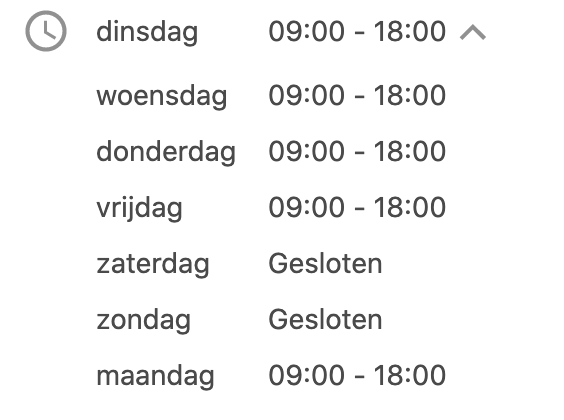
By providing your customers with clarity and information about when they can expect a response, you prevent frustration. Are you open until 6:00 PM and a customer sends you a message at 6:30 PM? Then they know they don't need to expect an immediate answer. This prevents irritation. However, try to respond within 24 hours. To make the most of your opening hours, it's smart to set up out-of-office messages. You can configure these messages to be sent only outside of opening hours. For example, mention what time they can expect a response from you!
By filling out your business profile on your WhatsApp Business account correctly and indicating your opening hours as realistically as possible, you can significantly improve your customer service. With Wappy, you can take it a step further!
55% of people say that their trust in a company increases when they can chat with that company.
By creating a Wappy account, website visitors can directly reach you from your website. Through the widget, they can easily send you a message to your WhatsApp Business account without having to add your number! Take the next step towards better customer relationships with Wappy.

niice
Wappy helps businesses connect with website visitors through WhatsApp. With over 2,400 websites using our widget, we share practical tips on WhatsApp Business and customer communication.
End of this Wappy article🤓



Do you want to try Wappy first? Then we have a free version available for you!
Over 2,400 websites use Wappy for customer contact